DIGITAL SIGNATURES AND AUTHORIZATION PROTOCOLS
DIGITAL SIGNATURES AND AUTHORIZATION PROTOCOLS
CS 319 - Week 14 Lesson
1. Introduction to Digital Signatures
What is a Digital Signature?
A digital signature is a mathematical technique used to validate the authenticity and integrity of a digital message, document, or software. Think of it as the electronic equivalent of a handwritten signature or stamped seal, but with far more security.
Why Do We Need Digital Signatures?
Digital signatures provide three critical security services:
- Authentication - Verifies the identity of the sender
- Integrity - Ensures the message hasn't been altered
- Non-repudiation - Prevents the sender from denying they sent the message
Real-World Analogy
Imagine you're signing a contract:
- Physical World: You sign with a pen, and your unique handwriting proves it's you
- Digital World: You "sign" with cryptographic keys, and mathematics proves it's you
2. Digital Signature Standards
2.1 How Digital Signatures Work
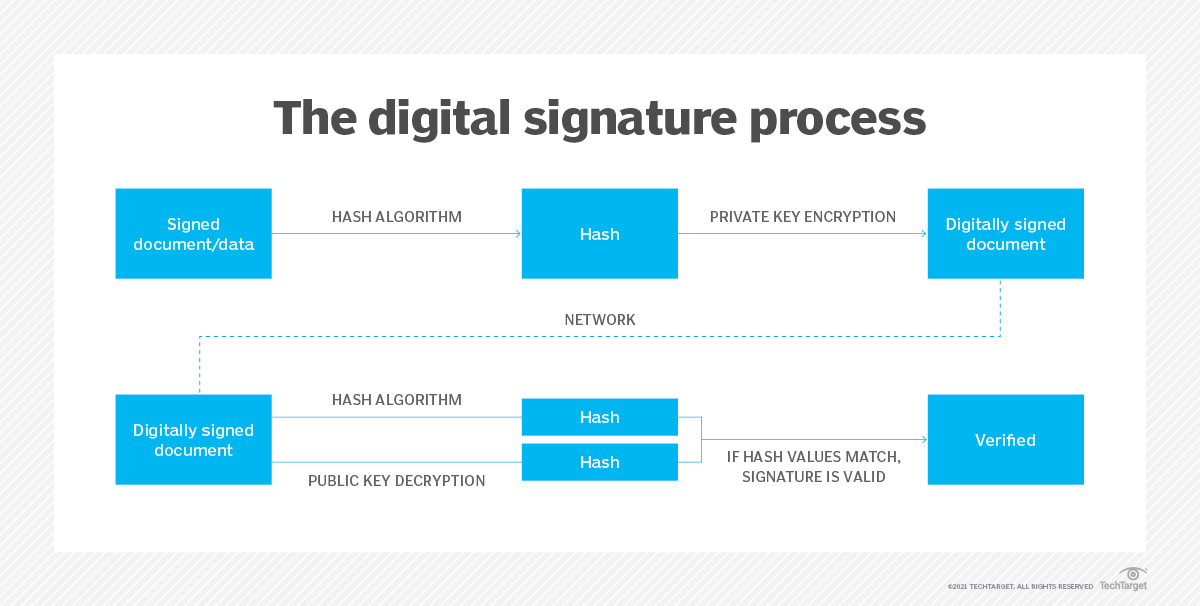
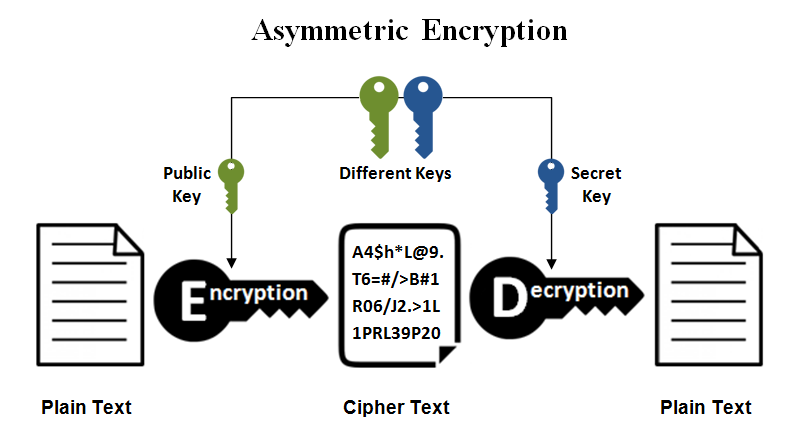
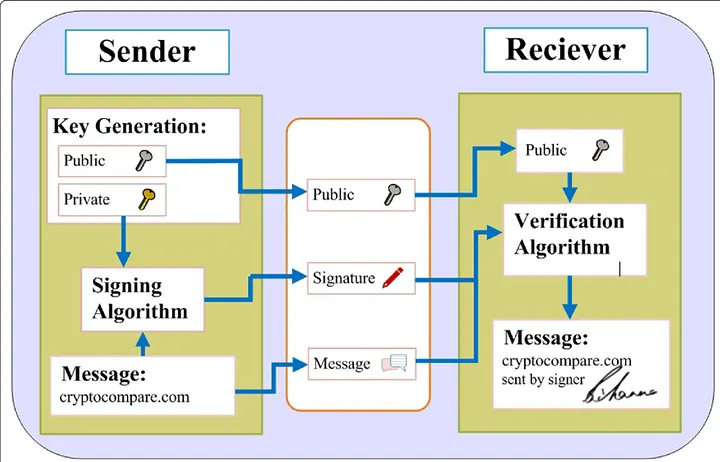
Digital signatures use asymmetric cryptography (public-key cryptography):
Sender's Side:
- Create a message
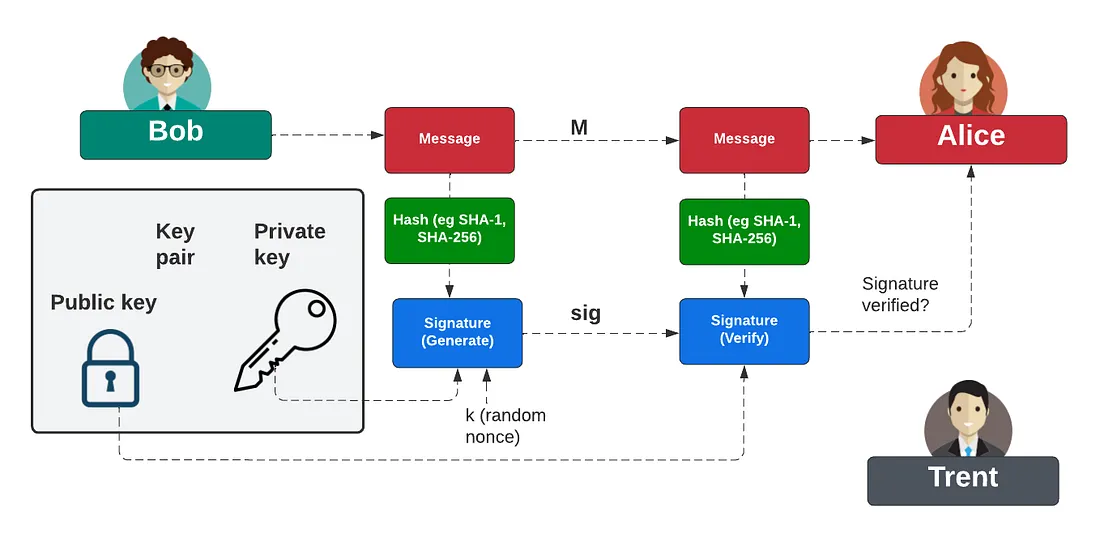
- Generate a hash of the message
- Encrypt the hash with your PRIVATE key → This is the digital signature
- Send both the message and the signature
Receiver's Side:
- Receive the message and signature
- Decrypt the signature using sender's PUBLIC key → Get the original hash
- Generate a new hash from the received message
- Compare both hashes:
- If they match → Message is authentic and unaltered ✓
- If they don't match → Message was tampered with or fake ✗
2.2 Key Digital Signature Standards
A. DSA (Digital Signature Algorithm)
Overview:
- Developed by the National Security Agency (NSA)
- Part of the Digital Signature Standard (DSS) - FIPS 186
- Uses modular exponentiation and discrete logarithm problem
Key Features:
- Key sizes: 1024, 2048, or 3072 bits
- Used primarily for signing (not encryption)
- Slower than RSA but produces smaller signatures
Basic DSA Process:
Key Generation:
1. Choose a prime number p (modulus)
2. Choose a prime divisor q of (p-1)
3. Choose generator g
4. Private key: random x (where 0 < x < q)
5. Public key: y = g^x mod p

Signing:
1. Generate random k (where 0 < k < q)
2. Calculate r = (g^k mod p) mod q
3. Calculate s = (k^-1(Hash(m) + xr)) mod q
4. Signature is (r, s)

Verification:
1. Calculate w = s^-1 mod q
2. Calculate u1 = Hash(m) × w mod q
3. Calculate u2 = r × w mod q
4. Calculate v = ((g^u1 × y^u2) mod p) mod q
5. Signature is valid if v = r
B. RSA Signatures
Overview:
- Named after Rivest, Shamir, and Adleman
- Most widely used digital signature algorithm
- Can be used for both encryption and signing
Key Features:
- Key sizes: 2048, 3072, or 4096 bits (2048+ recommended)
- Fast verification
- Widely supported
Basic RSA Signature Process:
Key Generation:
1. Choose two large prime numbers: p and q
2. Calculate n = p × q (modulus)
3. Calculate φ(n) = (p-1)(q-1)
4. Choose public exponent e (commonly 65537)
5. Calculate private exponent d where (d × e) mod φ(n) = 1
6. Public key: (e, n)
7. Private key: (d, n)

Signing:
1. Compute hash H = Hash(message)
2. Signature S = H^d mod n

Verification:
1. Compute hash H = Hash(message)
2. Compute H' = S^e mod n
3. If H = H', signature is valid
C. ECDSA (Elliptic Curve Digital Signature Algorithm)
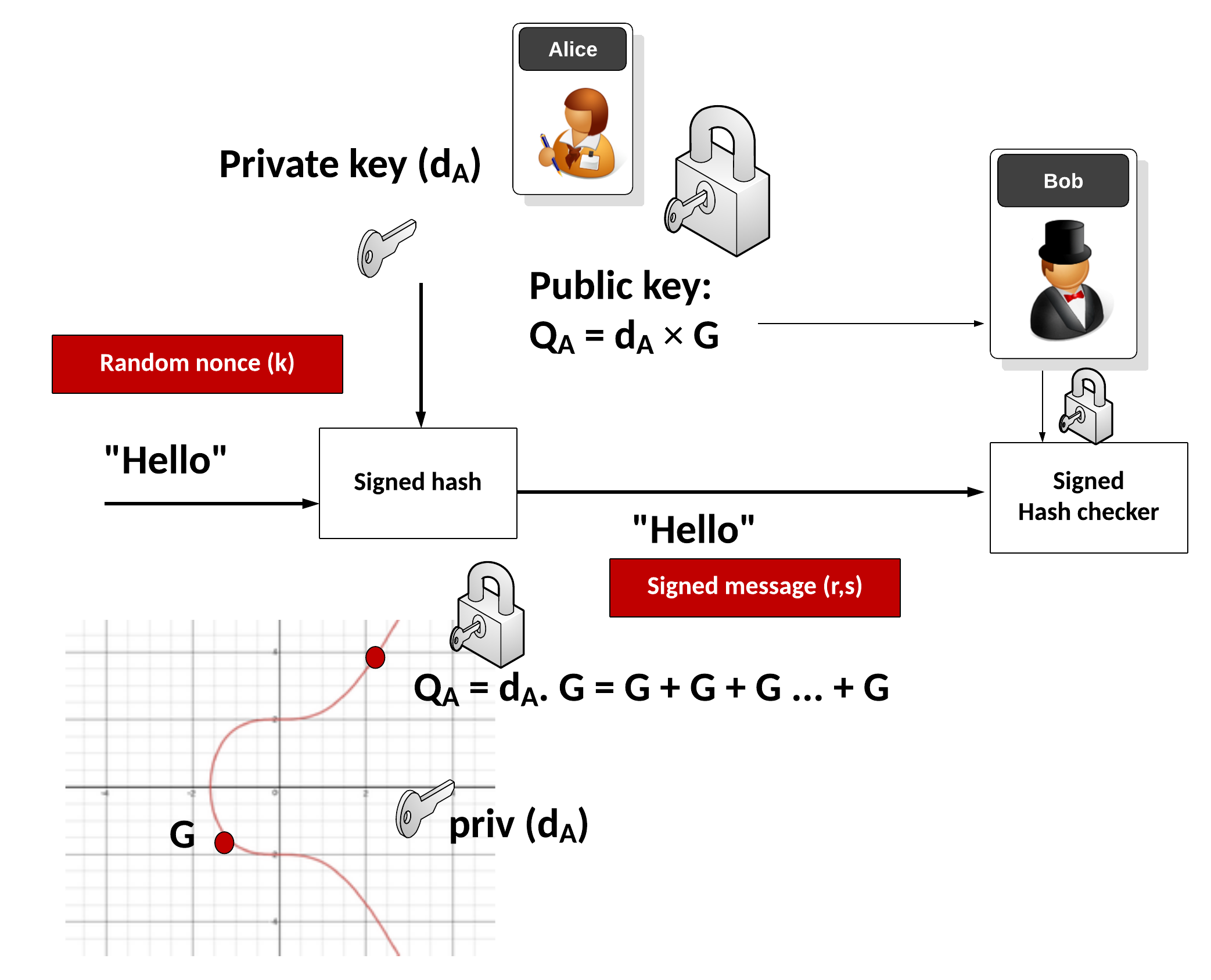
Overview:
- Modern variant using elliptic curve cryptography
- Provides same security as RSA with smaller key sizes
- Increasingly popular in mobile and IoT applications
Key Features:
- Much smaller keys (256-bit ECDSA ≈ 3072-bit RSA security)
- Faster computation
- Lower bandwidth and storage requirements
- Used in Bitcoin, blockchain, and modern TLS
Key Size Comparison:
| Security Level | RSA/DSA Key Size | ECDSA Key Size |
|---|---|---|
| 80-bit | 1024 bits | 160 bits |
| 128-bit | 3072 bits | 256 bits |
| 192-bit | 7680 bits | 384 bits |
| 256-bit | 15360 bits | 512 bits |
D. EdDSA (Edwards-curve Digital Signature Algorithm)
Overview:
- Newest standard using twisted Edwards curves
- Designed to be faster and more secure than ECDSA
- Ed25519 is the most popular variant
Key Features:
- Deterministic (no random number generation needed)
- Resistant to side-channel attacks
- Fast signing and verification
- Used in SSH, TLS 1.3, and Signal Protocol
2.3 Hash Functions in Digital Signatures
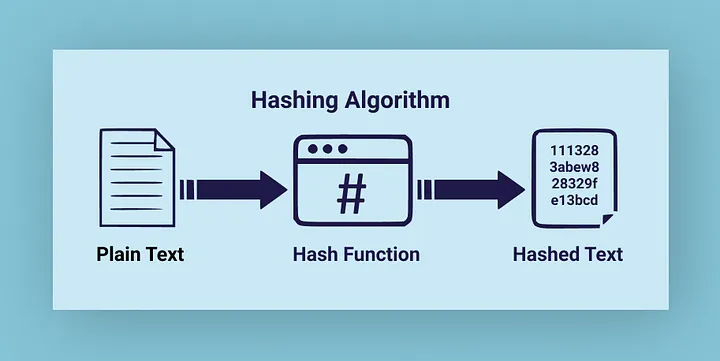
Digital signatures rely on cryptographic hash functions:
Common Hash Functions:
-
SHA-256 (Secure Hash Algorithm 256-bit)
- Part of SHA-2 family
- Produces 256-bit hash
- Widely used, recommended
-
SHA-384 / SHA-512
- Stronger variants for high-security needs
- Produce 384-bit and 512-bit hashes
-
SHA-3
- Latest standard (2015)
- Different construction than SHA-2
- Additional security margin
⚠️ Deprecated/Insecure:
- MD5 - DO NOT USE (broken)
- SHA-1 - DO NOT USE (collision attacks possible)
3. Authentication Services
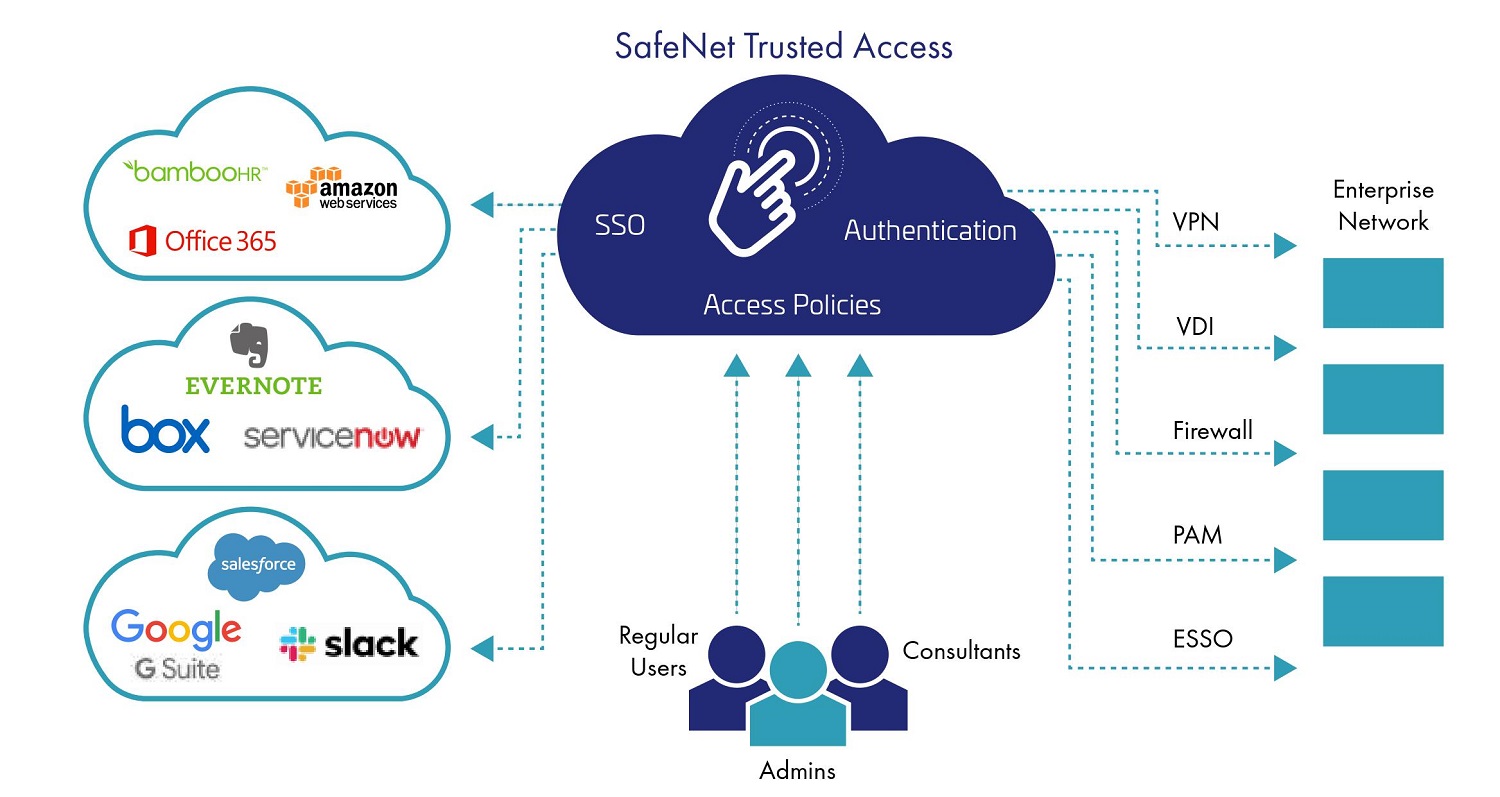
3.1 What is Authentication?
Authentication is the process of verifying the identity of a user, device, or entity in a computer system.
3.2 Types of Authentication Factors
The Three Authentication Factors:
-
Something You Know
- Passwords
- PINs
- Security questions
- Passphrases
-
Something You Have
- Smart cards
- Security tokens
- Mobile devices (for SMS/app-based codes)
- Hardware keys (YubiKey, etc.)
-
Something You Are
- Fingerprints
- Facial recognition
- Iris/retina scans
- Voice recognition
3.3 Multi-Factor Authentication (MFA)
Definition: Using two or more authentication factors to verify identity.
Types:
- Two-Factor Authentication (2FA): Uses two different factors
- Three-Factor Authentication (3FA): Uses all three factors

Example:
Logging into online banking:
1. Password (Something You Know)
2. SMS code to your phone (Something You Have)
→ This is 2FA
3.4 Authentication Services in Security Architecture
Key Authentication Services:
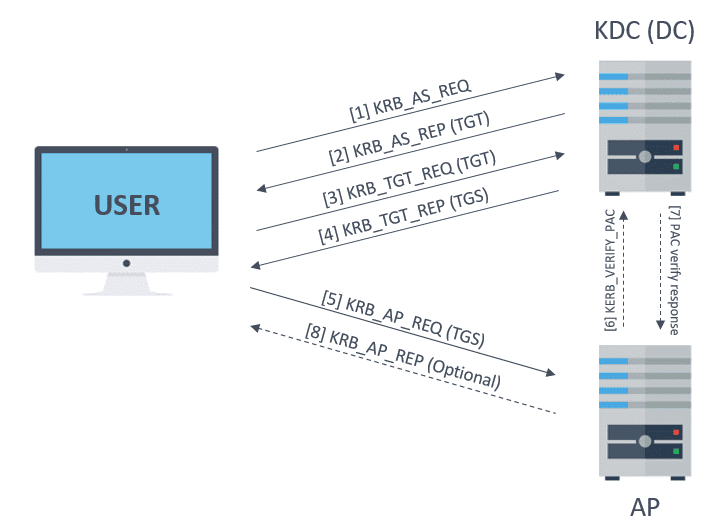
A. Kerberos
- Network authentication protocol
- Uses tickets to prove identity
- Widely used in Windows Active Directory
- Single Sign-On (SSO) capability\
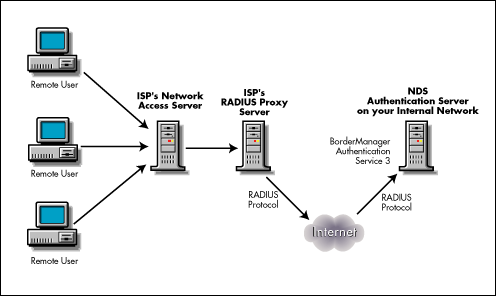
B. RADIUS (Remote Authentication Dial-In User Service)
- Client-server protocol
- Centralized authentication for network access
- Used by ISPs and enterprises\
C. LDAP (Lightweight Directory Access Protocol)
- Directory service for authentication
- Stores user credentials centrally
- Used in many enterprise systems
D. OAuth 2.0
- Authorization framework
- Allows third-party access without sharing passwords
- Used by Google, Facebook, GitHub for "Sign in with..." features
E. OpenID Connect
- Authentication layer on top of OAuth 2.0
- Provides user identity information
- Modern standard for federated authentication
4. Authentication Protocols
4.1 What is an Authentication Protocol?
An authentication protocol is a set of rules and procedures for verifying identity in a secure communication system.
4.2 Common Authentication Protocols
Protocol 1: Challenge-Response Authentication

How it works:
1. Client → Server: "I am Alice, let me in"
2. Server → Client: "Prove it! Here's a random challenge: XYZ123"
3. Client encrypts challenge with secret key → ABC789
4. Client → Server: "Here's my response: ABC789"
5. Server decrypts response and verifies
6. If correct → Access granted
Advantages:
- Password never transmitted over network
- Protects against eavesdropping
- Different challenge each time (replay attack protection)
Example: CHAP (Challenge Handshake Authentication Protocol)
Protocol 2: Password Authentication Protocol (PAP)
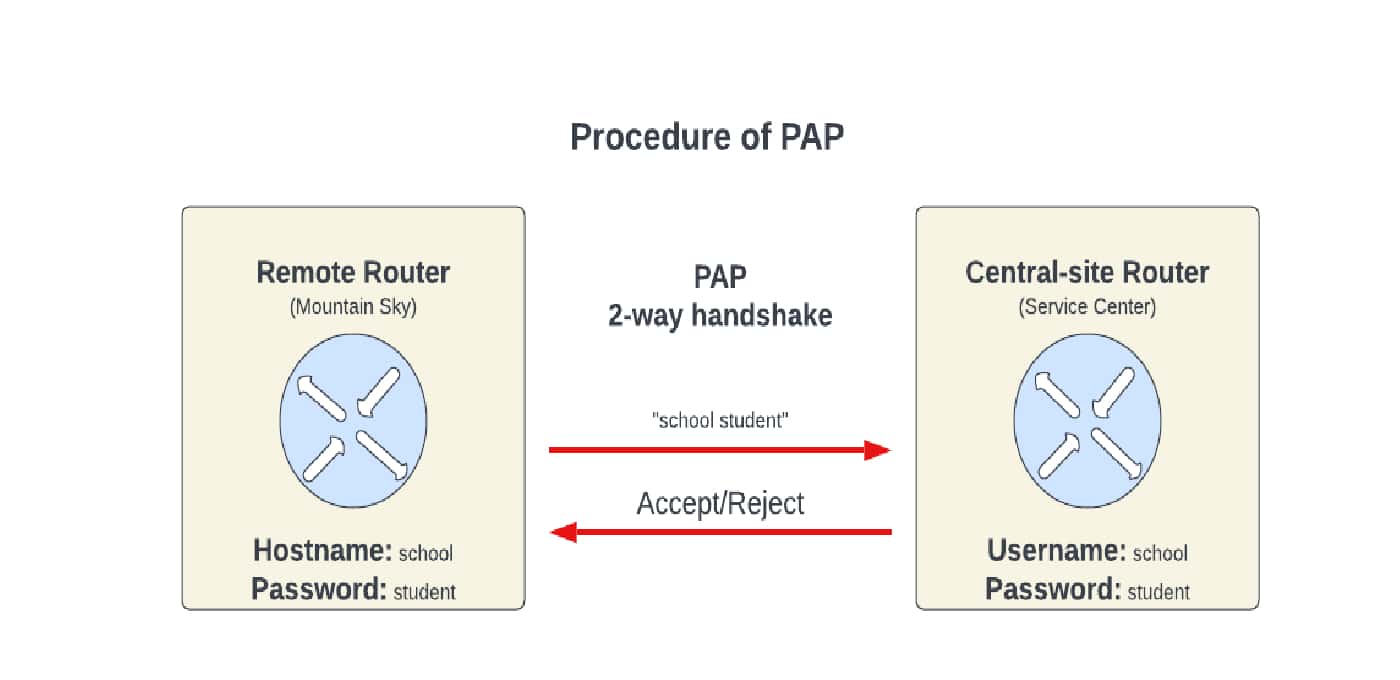
How it works:
1. Client → Server: Username and password (in plaintext or weakly encrypted)
2. Server verifies credentials
3. Access granted or denied
Issues:
- ⚠️ Insecure - credentials can be intercepted
- ⚠️ No protection against replay attacks
- Should only be used over encrypted channels (TLS/SSL)
Protocol 3: Kerberos Protocol
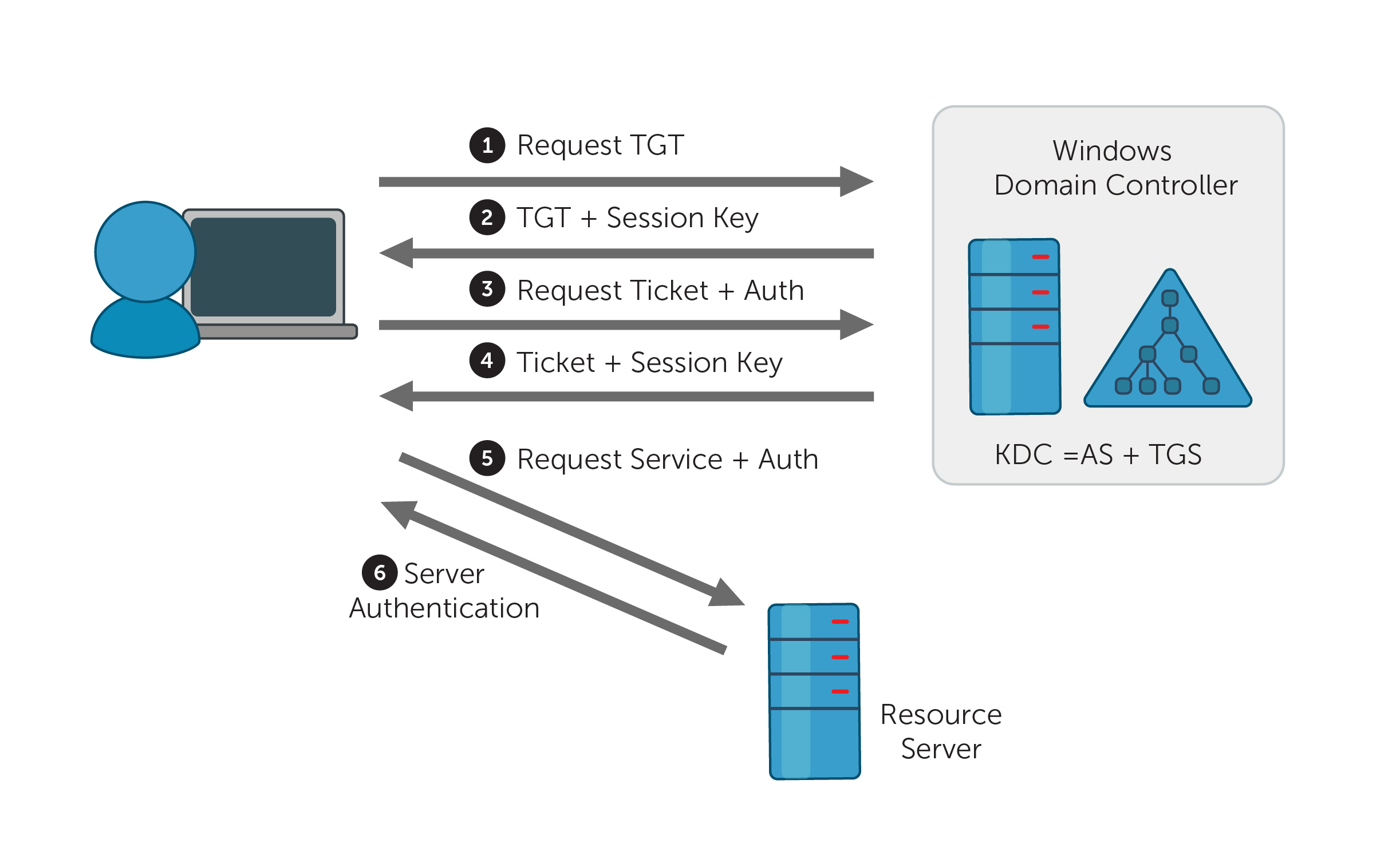
Overview:
- Developed at MIT
- Uses tickets for authentication
- Trusted third-party model
Components:
- Client: User requesting access
- Server: Resource the user wants to access
- Key Distribution Center (KDC): Trusted authentication server
- Authentication Server (AS): Issues Ticket Granting Tickets
- Ticket Granting Server (TGS): Issues service tickets
Kerberos Process (Simplified):
Step 1: Initial Authentication
Client → AS: "I'm Alice, I need a TGT"
AS → Client: Ticket Granting Ticket (TGT) encrypted with Alice's password

Step 2: Service Request
Client → TGS: "I need access to File Server" + TGT
TGS → Client: Service Ticket for File Server

Step 3: Service Access
Client → File Server: Service Ticket
File Server: Verifies ticket and grants access
Key Features:
- Single Sign-On (SSO)
- Mutual authentication (both client and server verify each other)
- Time-limited tickets (prevents replay attacks)
- No passwords sent over network
Protocol 4: SSL/TLS Handshake
Overview:
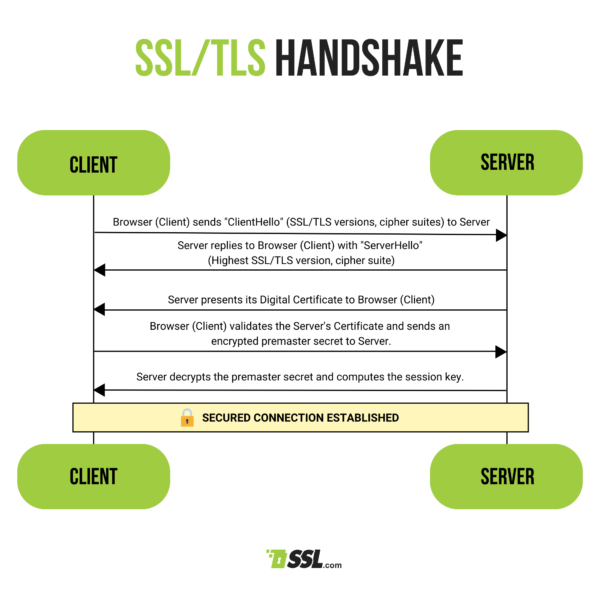
- Establishes secure connection between client and server
- Provides authentication, encryption, and integrity
TLS Handshake Process (Simplified):
1. Client Hello
   - Supported cipher suites
   - Random number

2. Server Hello
   - Selected cipher suite
   - Server certificate (with public key)
   - Random number

3. Client Verification
   - Verifies server certificate
   - Generates pre-master secret
   - Encrypts with server's public key

4. Key Generation
   - Both sides generate session keys
   - From random numbers + pre-master secret

5. Finished Messages
   - Both sides confirm secure connection established
Protocol 5: OAuth 2.0 Flow
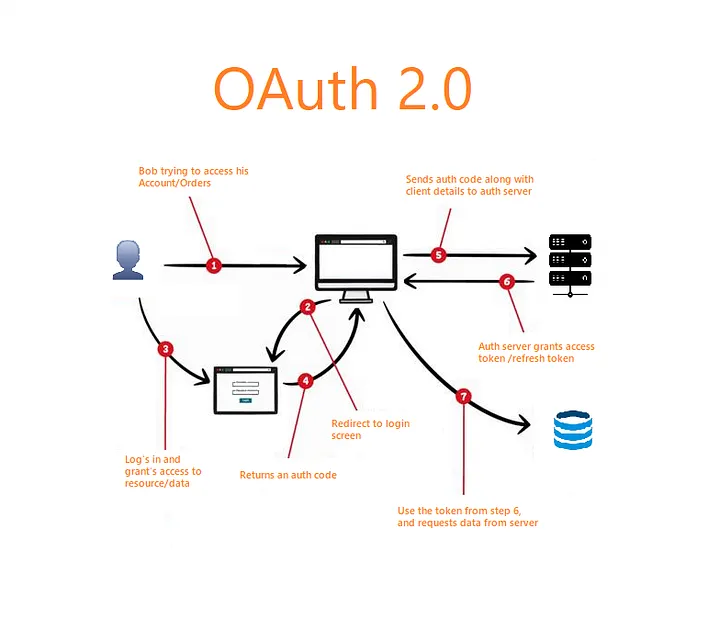
Authorization Code Flow (Most Common):
1. User clicks "Sign in with Google" on App
2. App redirects to Google's authorization server
3. User logs in to Google and grants permission
4. Google redirects back to App with authorization code
5. App exchanges code for access token (backend)
6. App uses access token to access user's Google data
Key Concept:
- OAuth is for AUTHORIZATION (what you can access)
- OpenID Connect adds AUTHENTICATION (who you are)
Protocol 6: SAML (Security Assertion Markup Language)

Overview:
- XML-based standard for exchanging authentication data
- Used for Single Sign-On (SSO) in enterprise environments
SAML Flow:
1. User tries to access Service Provider (SP) - e.g., Salesforce
2. SP redirects to Identity Provider (IdP) - e.g., company's AD
3. User authenticates with IdP
4. IdP sends SAML assertion to SP
5. SP validates assertion and grants access
Use Cases:
- Enterprise SSO
- Cloud service authentication
- Federated identity management
4.3 Modern Authentication Protocols
FIDO2 / WebAuthn
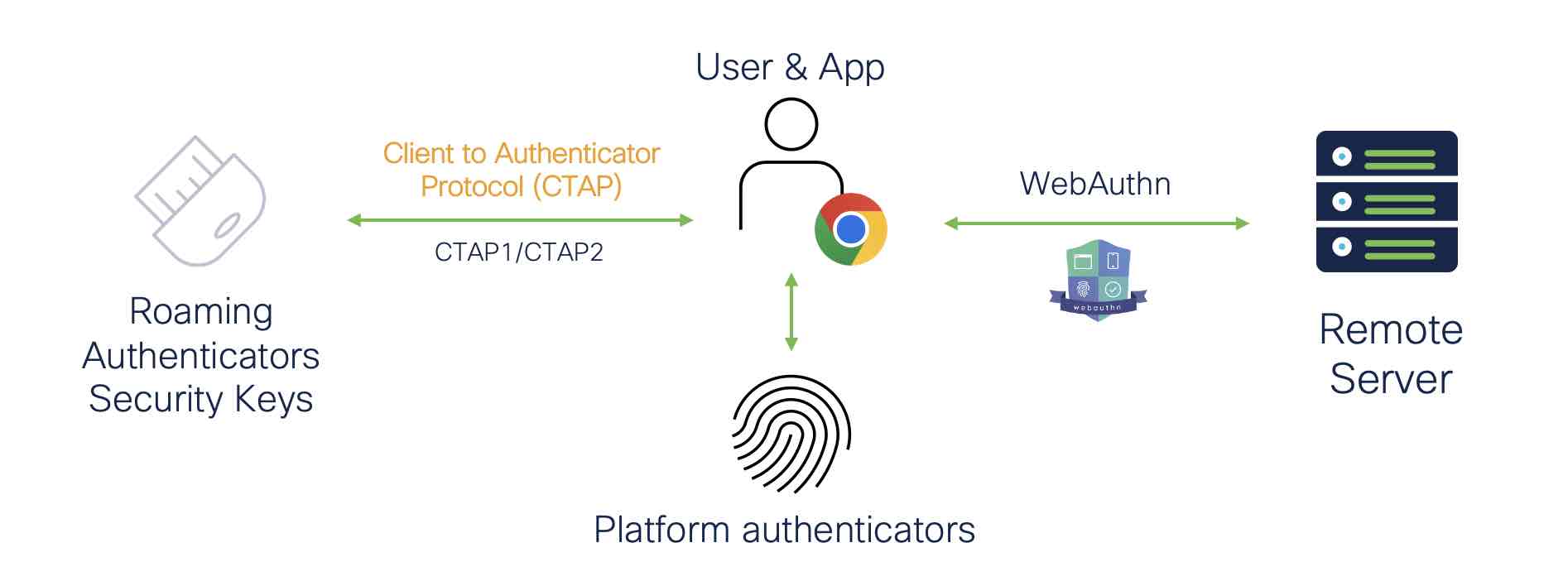
Overview:
- Passwordless authentication standard
- Uses public-key cryptography
- Hardware security keys or biometrics
How it works:
Registration:
1. User registers with website
2. Browser/device generates key pair
3. Public key sent to server
4. Private key stays on device (never leaves!)

Authentication:
1. Server sends challenge
2. User authenticates locally (fingerprint, PIN, etc.)
3. Device signs challenge with private key
4. Server verifies signature with public key
Benefits:
- No passwords to steal
- Phishing-resistant
- Hardware-backed security
5. Practical Applications
5.1 Digital Signatures in Real Life
A. Document Signing
- Adobe Sign, DocuSign: Legally binding electronic signatures
- PDF Signatures: Embedded digital certificates
- Contract Management: Automated workflow with signature verification
B. Software Distribution
- Code Signing: Verifies software hasn't been tampered with
- Windows: Authenticode
- macOS: Apple Developer Certificate
- Linux: GPG signatures for packages
- App Stores: All apps digitally signed by developers
C. Blockchain and Cryptocurrency
- Bitcoin Transactions: Signed with private keys
- Smart Contracts: Digital signatures authorize execution
- NFTs: Prove ownership through signatures
D. Email Security
- S/MIME: Secure email with digital signatures
- PGP/GPG: Email encryption and signing
- DKIM: Email server authentication
E. Government and Legal
- e-Government Services: Tax filing, permits, licenses
- Digital Identity Cards: National ID systems
- Legal Documents: Wills, deeds, court filings
5.2 Authentication in Modern Systems
A. Web Applications
- Session-based authentication
- Token-based authentication (JWT)
- OAuth for social login
- Multi-factor authentication
B. Mobile Apps
- Biometric authentication (Touch ID, Face ID)
- App-based 2FA (Google Authenticator, Authy)
- Push notifications for authentication
C. Enterprise Systems
- Single Sign-On (SSO) with SAML
- Active Directory integration
- Certificate-based authentication
- Hardware token authentication
D. Cloud Services
- API keys and access tokens
- Service accounts
- Federated identity
- Temporary credentials (AWS STS)
6. Hands-on Examples
Example 1: Generating RSA Keys and Signing (Python)
from cryptography.hazmat.primitives import hashes
from cryptography.hazmat.primitives.asymmetric import rsa, padding
from cryptography.hazmat.primitives import serialization

# Generate RSA key pair
private_key = rsa.generate_private_key(
    public_exponent=65537,
    key_size=2048
)
public_key = private_key.public_key()

# Message to sign
message = b"This is a confidential document"

# Sign the message
signature = private_key.sign(
    message,
    padding.PSS(
        mgf=padding.MGF1(hashes.SHA256()),
        salt_length=padding.PSS.MAX_LENGTH
    ),
    hashes.SHA256()
)

print(f"Signature (hex): {signature.hex()[:64]}...")

# Verify the signature
try:
    public_key.verify(
        signature,
        message,
        padding.PSS(
            mgf=padding.MGF1(hashes.SHA256()),
            salt_length=padding.PSS.MAX_LENGTH
        ),
        hashes.SHA256()
    )
    print("✓ Signature is valid!")
except:
    print("✗ Signature is invalid!")

# Try to verify with modified message
tampered_message = b"This is a public document"
try:
    public_key.verify(
        signature,
        tampered_message,
        padding.PSS(
            mgf=padding.MGF1(hashes.SHA256()),
            salt_length=padding.PSS.MAX_LENGTH
        ),
        hashes.SHA256()
    )
    print("✓ Signature is valid!")
except:
    print("✗ Signature is invalid! Message was tampered!")
Example 2: Creating JWT Tokens (JavaScript/Node.js)
const jwt = require('jsonwebtoken');

// Secret key (keep this secure!)
const SECRET_KEY = 'your-secret-key-here';

// Create a token
const payload = {
    userId: 12345,
    username: 'alice',
    role: 'student',
    email: '[email protected]'
};

const token = jwt.sign(payload, SECRET_KEY, {
    expiresIn: '1h',  // Token expires in 1 hour
    issuer: 'CS319-App',
    algorithm: 'HS256'
});

console.log('Generated Token:');
console.log(token);

// Verify and decode the token
try {
    const decoded = jwt.verify(token, SECRET_KEY);
    console.log('\n✓ Token is valid!');
    console.log('Decoded payload:', decoded);
} catch (error) {
    console.log('✗ Token verification failed:', error.message);
}

// Try with tampered token
const tamperedToken = token.slice(0, -5) + 'XXXXX';
try {
    jwt.verify(tamperedToken, SECRET_KEY);
    console.log('✓ Token is valid!');
} catch (error) {
    console.log('\n✗ Tampered token rejected:', error.message);
}
Example 3: Simple Challenge-Response Authentication (Python)
import hashlib
import secrets

class AuthenticationServer:
    def __init__(self):
        # Store hashed passwords
        self.users = {
            'alice': hashlib.sha256('password123'.encode()).hexdigest(),
            'bob': hashlib.sha256('securepass'.encode()).hexdigest()
        }
        self.challenges = {}

    def generate_challenge(self, username):
        """Generate random challenge for user"""
        if username not in self.users:
            return None

        challenge = secrets.token_hex(16)
        self.challenges[username] = challenge
        return challenge

    def verify_response(self, username, response):
        """Verify the response to challenge"""
        if username not in self.challenges:
            return False

        challenge = self.challenges[username]
        password_hash = self.users.get(username)

        # Expected response: hash(challenge + password_hash)
        expected = hashlib.sha256(
            (challenge + password_hash).encode()
        ).hexdigest()

        # Verify and clean up
        is_valid = response == expected
        del self.challenges[username]
        return is_valid

# Simulation
class Client:
    def __init__(self, username, password):
        self.username = username
        self.password_hash = hashlib.sha256(password.encode()).hexdigest()

    def respond_to_challenge(self, challenge):
        """Create response to server's challenge"""
        response = hashlib.sha256(
            (challenge + self.password_hash).encode()
        ).hexdigest()
        return response

# Example usage
print("=== Challenge-Response Authentication Demo ===\n")

server = AuthenticationServer()
alice = Client('alice', 'password123')

# Step 1: Request challenge
print(f"1. Alice requests authentication")
challenge = server.generate_challenge('alice')
print(f"2. Server sends challenge: {challenge}\n")

# Step 2: Client responds
response = alice.respond_to_challenge(challenge)
print(f"3. Alice computes response: {response[:32]}...\n")

# Step 3: Server verifies
if server.verify_response('alice', response):
    print("✓ Authentication successful! Alice is logged in.")
else:
    print("✗ Authentication failed!")

# Try with wrong password
print("\n=== Attempted Attack ===\n")
attacker = Client('alice', 'wrongpassword')
challenge = server.generate_challenge('alice')
response = attacker.respond_to_challenge(challenge)

if server.verify_response('alice', response):
    print("✓ Authentication successful!")
else:
    print("✗ Authentication failed! Wrong password detected.")
Example 4: Hash Function Demonstration (Python)
import hashlib

def demonstrate_hash_properties():
    """Demonstrate key properties of cryptographic hash functions"""

    print("=== Hash Function Properties Demo ===\n")

    # Property 1: Deterministic
    print("1. DETERMINISTIC - Same input = Same output")
    message = "Hello, CS319!"
    hash1 = hashlib.sha256(message.encode()).hexdigest()
    hash2 = hashlib.sha256(message.encode()).hexdigest()
    print(f"   Input: {message}")
    print(f"   Hash 1: {hash1}")
    print(f"   Hash 2: {hash2}")
    print(f"   Equal? {hash1 == hash2}\n")

    # Property 2: Avalanche Effect
    print("2. AVALANCHE EFFECT - Small change = Completely different hash")
    message1 = "Hello, CS319!"
    message2 = "Hello, CS319."  # Changed ! to .
    hash1 = hashlib.sha256(message1.encode()).hexdigest()
    hash2 = hashlib.sha256(message2.encode()).hexdigest()
    print(f"   Input 1: {message1}")
    print(f"   Hash 1:  {hash1}")
    print(f"   Input 2: {message2}")
    print(f"   Hash 2:  {hash2}")
    print(f"   Similar? {hash1 == hash2}\n")

    # Property 3: Fixed Size Output
    print("3. FIXED SIZE - Any input length → Same output length")
    short = "Hi"
    long = "A" * 1000
    hash_short = hashlib.sha256(short.encode()).hexdigest()
    hash_long = hashlib.sha256(long.encode()).hexdigest()
    print(f"   Short input ({len(short)} chars): {hash_short}")
    print(f"   Long input ({len(long)} chars):  {hash_long}")
    print(f"   Both are {len(hash_short)} characters (256 bits)\n")

    # Property 4: One-way Function
    print("4. ONE-WAY - Cannot reverse hash to get original message")
    original = "secret_password"
    hashed = hashlib.sha256(original.encode()).hexdigest()
    print(f"   Original: {original}")
    print(f"   Hash:     {hashed}")
    print(f"   Can we get '{original}' from hash? NO! (computationally infeasible)")

demonstrate_hash_properties()
Additional Resources
Recommended Reading
- "Applied Cryptography" by Bruce Schneier - Comprehensive coverage of cryptographic protocols
- "Cryptography and Network Security" by William Stallings - Excellent textbook for students
- NIST Digital Signature Standard (DSS) - Official specification FIPS 186-4
Online Resources
- cryptography.io - Python cryptography library documentation
- jwt.io - JWT token decoder and documentation
- auth0.com/learn - Authentication and authorization tutorials
- OWASP Authentication Cheat Sheet - Security best practices
Tools to Explore
- OpenSSL - Command-line tool for cryptographic operations
- GnuPG (GPG) - Email encryption and signing
- Wireshark - Network protocol analyzer (see TLS handshakes)
- YubiKey - Hardware authentication token
Glossary
Asymmetric Cryptography: Encryption system using a pair of keys (public and private) where data encrypted with one key can only be decrypted with the other.
Challenge-Response: Authentication method where the server sends a random challenge that the client must correctly respond to using a shared secret.
Digital Certificate: Electronic document that binds a public key to an identity, issued by a Certificate Authority.
Hash Function: One-way function that takes input of any length and produces fixed-size output (hash/digest).
Non-repudiation: Property that prevents someone from denying they performed an action (like sending a message).
Public Key Infrastructure (PKI): Framework for managing digital certificates and public-key encryption.
Salt: Random data added to passwords before hashing to prevent dictionary attacks.
Session Token: Temporary credential used to authenticate a user during a session.
Single Sign-On (SSO): Authentication method allowing users to access multiple applications with one set of credentials.
Ticket: Time-limited authentication token (as used in Kerberos).